 EV SOUND FX
Guides / Simulator
Engine Sound Simulator Online: Try a V8 Free in Your Browser
Try a free online engine sound simulator: rev a V8, rotary or inline-six and take a virtual 0–60 drive in your browser. No download or sign-up.
Short answer: you can try an engine sound simulator free in your browser on the EV Sound FX homepage. Pick a sound such as the V8 Twin Turbo, press Play sound, hold the rev button, or tap Take a virtual drive to hear the engine pull from 0 to 60 mph through the gears and slow back to a stop. There's nothing to download and no sign-up.
That's the quick version. Below is what the free preview actually does, how it differs from other kinds of engine simulators, and how to use the same sounds in a real car.
What "engine sound simulator" can mean
People search this for a few different things, so it helps to know which one you want:
- Engineering-style simulators. Desktop programs that model an engine's parts and generate sound from that. They're fascinating, but they're downloads and they're built for tinkering, not driving.
- Game sound packs. Looping recordings that developers drop into racing games. Useful if you're making a game, not if you want to hear something now.
- Phone apps. Apps that play engine sounds, sometimes following your speed while you drive.
- Browser simulators. Open a web page and play. This is what EV Sound FX is. The free preview works at a desk, and the full app follows your real speed in the car.
If you just want to hear a V8 rev and pull through the gears right now, a browser simulator is the fastest way.
How to try it free
- Open evsoundfx.com on a computer, phone or tablet. Turn your volume to a comfortable level.
- In the Interactive Preview, pick a sound tab: V8 Twin Turbo, Rotary, Inline-Six, Rally Boxer, Electric, Hover Car or Sci-fi.
- Press Play sound to start the engine at idle. Browsers only allow audio after you tap something, so this step matters.
- Press and hold Hold to Rev. The revs climb while you hold and fall when you let go.
- Tap Take a virtual drive. The preview runs from 0 to 60 mph and back to a stop. Watch the speed, the RPM bar and the gear readout change as it shifts, for example "AUTO · 2".
- Try the scenery buttons (Neon, Canyon, Coast, Alpine, Halloween, Stars) to change the background.
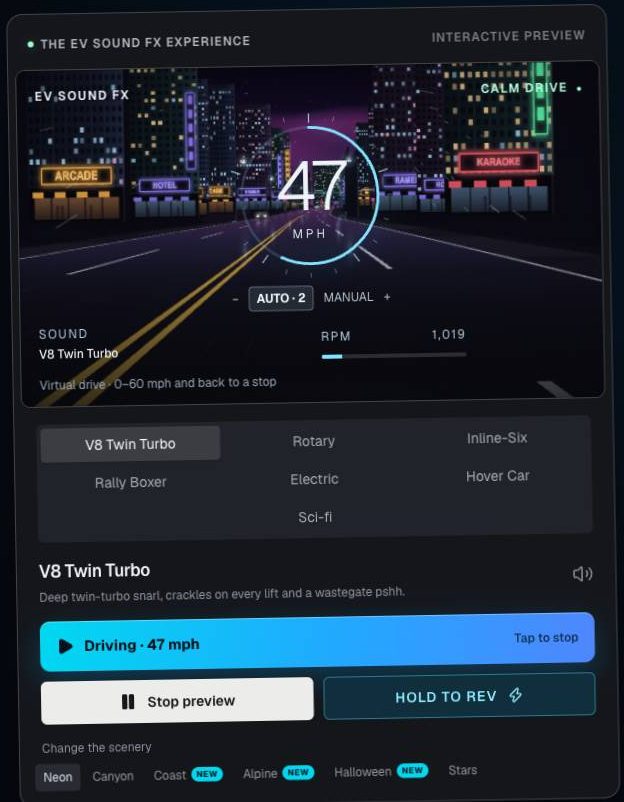
The free homepage preview partway through a virtual drive with the V8 Twin Turbo, captured November 21, 2026.
When no virtual drive is running, the preview says "Stationary sound demo · no GPS required". It works without location access.
The sounds in the free preview
| Preview tab | What you hear |
|---|---|
| V8 Twin Turbo | Deep twin-turbo snarl, crackles when you lift, and a wastegate pshh |
| Rotary | Two-rotor brap with big-turbo spool, blow-off and pops |
| Inline-Six | Raspy straight-six with turbo whoosh and flutter |
| Rally Boxer | Off-beat flat-four rumble with a rally turbo whistle |
| Electric | Smooth, futuristic electric swell |
| Hover Car | Retro-future flying-car whirr |
| Sci-fi | A warp-drive style sci-fi sound |
The full library has more, including the Flat-Six 9000 and several sci-fi sounds. Our engine sound guide has a table to help you choose, and the spaceship guide lists the futuristic ones.
What makes it sound like an engine
A single looping clip sounds fake fast. The simulator layers a few things together:
- Pitch and load. The note rises with revs and gets harder when the engine is working.
- Gears. On engine sounds, revs climb, then drop as it shifts up, the way a real car pulls through the gears.
- Lift-off effects. Crackles, pops and turbo sounds when you ease off, depending on the engine.
- The rev limiter. Hold the rev button and engine sounds bounce off the limiter at the top. More on that in our rev sound guide.
It's honest to say what it isn't: it's not an engineering model of combustion. It's built to sound convincing and respond to speed while you drive.
From desk to driver's seat
The preview is a taste. The full app at the sound hub plays the same kind of sound in a real car, following your actual speed:
- Tesla: open evsoundfx.com in the car's built-in browser. Sound comes through the cabin speakers.
- Other cars: open it on your phone and play through Bluetooth, Apple CarPlay or Android Auto, like music.
Speed comes from GPS, not from your accelerator pedal, so the sound follows how fast you're going rather than exactly how hard you press. Responsiveness can vary with GPS signal, browser and device. Do the setup while parked. Our setup guide walks through it step by step.
The full version adds every sound in the library, Sound Studio for making your own, driving scenes, and manual shifting with the Tesla steering wheel. It's $9.99 a month with a 14-day free trial, or $79.99 a year.
Hear it in your own car
EV Sound FX plays engine sounds that follow your real speed, right in the Tesla browser or from your phone over Bluetooth. Nothing to install.
Open the sound hub Setup guideFrequently asked questions
Is there a free engine sound simulator I can use online?
Yes. The EV Sound FX homepage has a free interactive preview. You can play seven sounds, including a V8 Twin Turbo, a rotary and an inline-six, hold a button to rev, and take a virtual drive from 0 to 60 mph and back. No download, account or payment is needed.
Do I need to download anything?
No. The preview runs in a normal web browser on a computer, phone or tablet. Tap Play sound first, because browsers only start audio after you press something on the page.
Is it a real physics simulation of an engine?
No. It is a sound simulator built for driving: it changes pitch, load and gears to match speed, and adds effects like crackles, turbo sounds and a rev limiter. It doesn't model pistons, valves or airflow the way an engineering simulator does.
Can I use it while I actually drive?
Yes, with the full app. In a Tesla you open evsoundfx.com in the car's browser. In other cars you play it from your phone over Bluetooth, CarPlay or Android Auto. The sound then follows your real speed from GPS. It doesn't read your accelerator pedal. Set it up while parked.
How much does the full version cost?
The preview is free. The full library, Sound Studio and driving features are $9.99 a month with a 14-day free trial, or $79.99 a year.